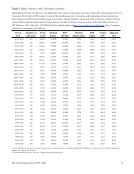
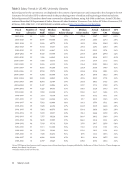
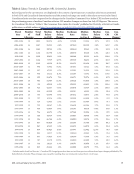
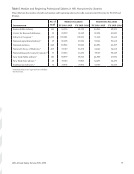
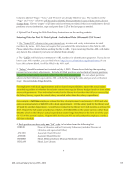
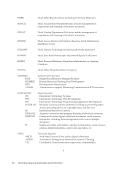
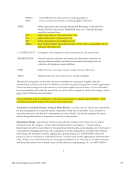
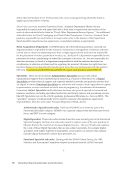
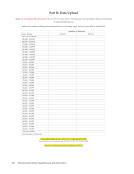
114 University Library Questionnaire and Instructions 3 3. The Beginning Professional Salary is the salary that would be paid to a newly hired professional without experience, not necessarily the lowest professional salary paid. In reporting the beginning salary, please use a figure that is actually used or likely to be used for entry-level librarians hired by your library, even if it is your practice rarely to hire entry-level professionals without experience. 4. Please report the 2015-16 Beginning Professional Salary to the best of your knowledge as it exists on July 1, 2015. Do not delay returning your survey with the expectation that more information will be available later. 5. The 2015-16 Average and Median Salary figures will be calculated by ARL from the individual data supplied. Part II: Data Upload -Individual Data (Microsoft CSV Form) 1. Part II of this survey requests individual-level information on salary, sex, minority status, rank, years of experience and working title for all filled positions for fiscal year 2015-16. Aggregated statistics for each institution will be calculated by ARL. Vacant positions should be excluded from your report. 2. Data for the Main, Law, and Medical libraries should be reported on separate CSV files. 3. Obtain the CSV file. These instructions assume that you have Microsoft Excel available for use and that you know how to save a spreadsheet in CSV format using Excel. (This is common functionality in many spreadsheet and database programs). The CSV file is available at: http://www.arlstatistics.org/About/Mailings/ss_2015-16. This is a generic, blank file that can hold data for Main, Law, or Medical libraries. The file’s name is “sal15xxxx.xls” open the file and save it to your own computer by choosing the “Save As” option in CSV. When saving the file, utilize ARL as the prefix for Main library reports, use 15 to designate the year (2015- 16), and change “xxxx" to your ARL institution code number, e.g., “ARL151150.xls.” Note: use MED for medical libraries, e.g. “MED151150” and LAW to denote law libraries, e.g., “LAW151150.” You can find your ARL institution code at: http://www.arlstatistics.org/about/instno The file contains columns labeled as follows: Required: Name/ID# (deleted before submitting) LibID Page Line Salary Job Sex OEOcat YrsExp Rank Percent Working Job Title Optional: Hisp NatAm Asian Black HawPI White In the LibID column, enter your ARL Library Institution Code. You can find your ARL institution code at: http://www.arlstatistics.org/about/instno
Help